Free download · iOS, Android & Mac
Your Network,
In Your Pocket
Scan every device on your Wi-Fi, look up IPs and domains, check open ports, run ping & traceroute — all from one fast, clean app.


Now on the Mac App Store
 IP Scanner: Network Tools
Your network.
A bigger perspective.
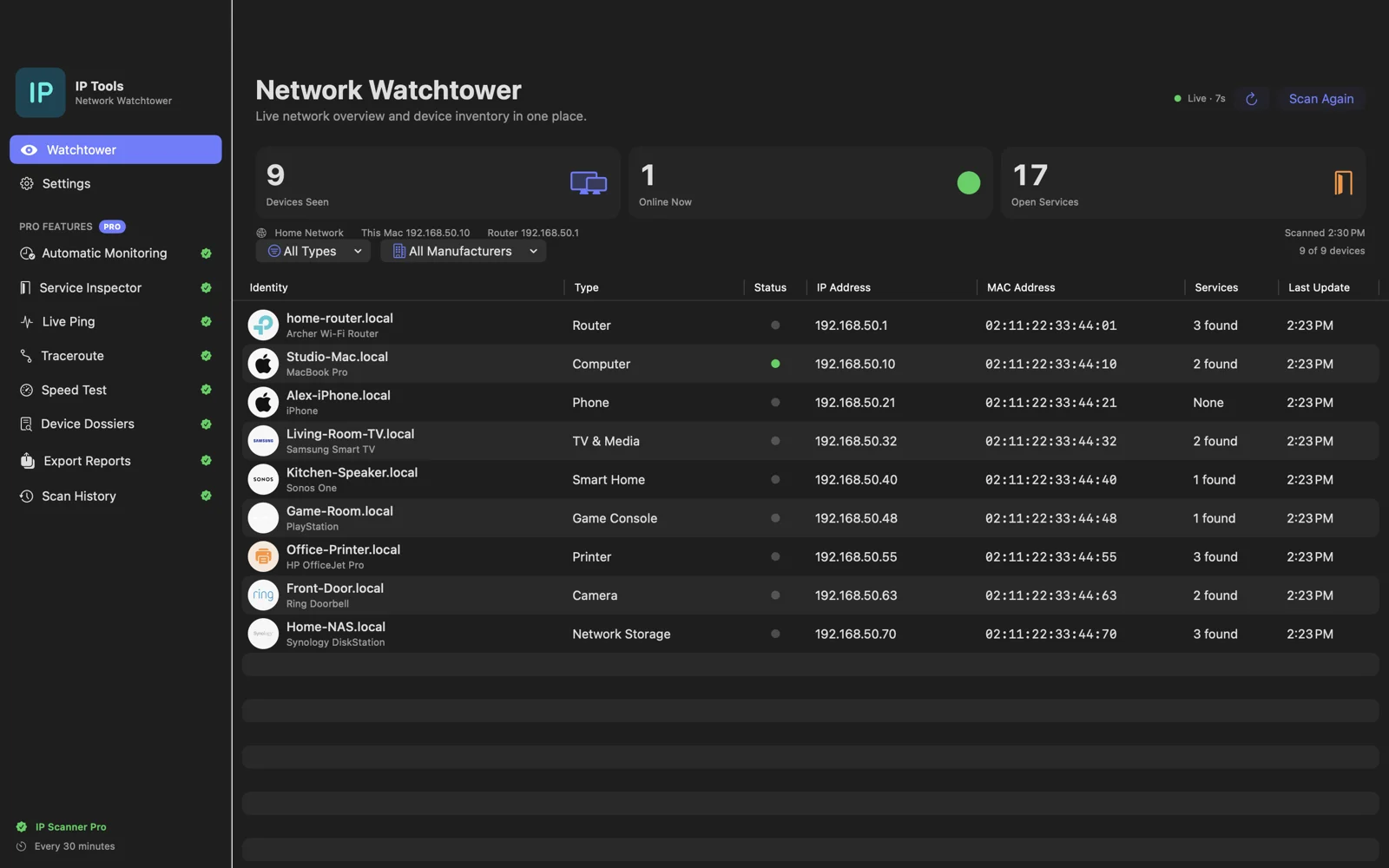
Meet the native Mac edition. Discover local devices in a spacious desktop workspace, then go deeper with Pro monitoring, service inspection, and scan history.
One basic scan free. Pro features available in-app.
What Is My IP Address?
Your public IP, location & network info — detected instantly, no sign-up needed.
Latitude and Longitude are near the centre of population and are not precise enough to identify a specific address or individual. IP data provided by ipapi.co.
Everything a Network Pro Needs
One app. Every tool. Nothing missing.
Wi-Fi Network Scanner
Discover every device on your local network — IPs, MAC addresses, hostnames, vendors, and open ports in seconds.
IP & DNS Lookup
Look up any IP for geolocation, ISP, and ASN. Run DNS queries for A, AAAA, MX, TXT, and NS records instantly.
Port Scanner
Scan any host or IP for open, closed, or filtered TCP/UDP ports. Identify running services and detect firewall gaps.
Ping & Traceroute
Measure latency and packet loss with real-time ping. Trace every hop between you and a destination to spot bottlenecks.
VPN & DNS Leak Test
Verify your VPN is actually hiding your identity. Detect DNS and WebRTC leaks that could expose your real location.
WHOIS & SSL Inspector
Query domain registration info, check certificate expiry, and review ownership records for any domain worldwide.
See It In Action
Real iOS screenshots — clean interface built for network professionals and home users alike.


Free Web Tools — No Sign-Up Required
All core network diagnostics available right from your browser.
 IP Lookup
Geolocation, ISP & ASN for any IP
DNS Lookup DNS Lookup
Query A, MX, TXT records & more
Port Checker Port Checker
Test open or closed TCP/UDP ports
Ping Tool Ping Tool
Test reachability & measure latency
WHOIS Lookup WHOIS Lookup
Domain registration & ownership
Traceroute Traceroute
Trace the network path to any host
SSL Checker SSL Checker
Certificate validity & expiry date
VPN Leak Test VPN Leak Test
Detect VPN, DNS & WebRTC leaks
Frequently Asked Questions
What is my IP address?
Your IP address is a unique number that identifies your device on the internet. The widget above detects your public IPv4 and IPv6 addresses automatically, along with your approximate location, ISP, and whether a VPN is active.
How do I scan devices on my Wi-Fi network?
Download the IP Scanner: Network Tools app for iOS or Android. It performs a fast LAN scan and lists every connected device with its IP address, MAC address, hostname, and open ports — all locally on your device.
Is IP Scanner free?
Yes, the app is free to download. Core features — network scanning, IP lookup, ping, traceroute, and DNS — are free. A Premium subscription unlocks unlimited scans and advanced tools with no ads.
Can I check open ports online?
Yes. Use the free Port Checker to test whether specific TCP ports on any host are open, closed, or filtered — no download needed.
How do I detect a VPN or DNS leak?
Use the VPN Leak Test tool on this site, or open the app and run the built-in VPN & DNS leak test. It checks whether your real IP address is leaking through DNS or WebRTC requests while a VPN is active.
Start Scanning Your Network Today
Free download. Available on iOS, Android and Mac. Premium unlocks unlimited scans and advanced tools.